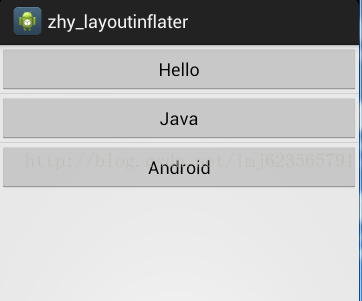
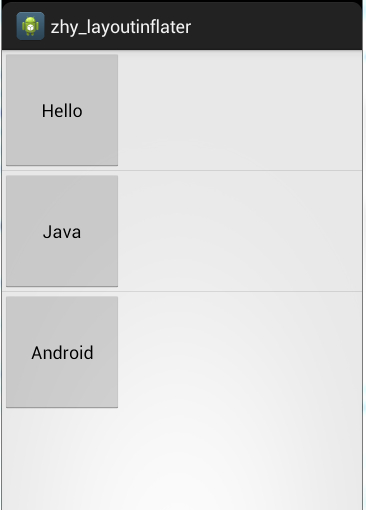
一、 题外话 相信大家对LayoutInflate都不陌生,特别在ListView的Adapter的getView方法中基本都会出现,使用inflate方法去加载一个布局,用于ListView的每个Item的布局。Inflate有三个参数,我在初学Android的时候这么理解的:
对于Inflate的三个参数(int resource, ViewGroup root, boolean attachToRoot)
如果inflate(layoutId, null )则layoutId的最外层的控件的宽高是没有效果的
如果inflate(layoutId, root, false ) 则认为和上面效果是一样的
如果inflate(layoutId, root, true ) 则认为这样的话layoutId的最外层控件的宽高才能正常显示
如果你也这么认为,那么你有就必要好好阅读这篇文章,因为这篇文章首先会验证上面的理解是 错误的 ,然后从源码角度去解释,最后会从ViewGroup与View的角度去解释。
二、 实践是验证真理的唯一标准 下面我写一个特别常见的例子来验证上面的理解是错误的,一个特别简单的ListView,每个Item中放一个按钮:
Activity的布局文件:
1 2 3 4 5 6 <ListView xmlns:android ="http://schemas.android.com/apk/res/android" xmlns:tools ="http://schemas.android.com/tools" android:id ="@+id/id_listview" android:layout_width ="fill_parent" android:layout_height ="wrap_content" ></ListView >
ListView的Item的布局文件:
1 2 3 4 5 6 <Button xmlns:android ="http://schemas.android.com/apk/res/android" xmlns:tools ="http://schemas.android.com/tools" android:id ="@+id/id_btn" android:layout_width ="120dp" android:layout_height ="120dp" > </Button >
ListView的适配器:
1
2
3
4
5
6
7
8
9
10
11
12
13
14
15
16
17
18
19
20
21
22
23
24
25
26
27
28
29
30
31
32
33
34
35
36
37
38
39
40
41
42
43
44
45
46
47
48
49
50
51
52
53
54
55
56
57
58
59
60
61
62
63
64
65
66
67
68
69
package com.example.zhy_layoutinflater;import java.util.List;import android.content.Context;import android.view.LayoutInflater;import android.view.View;import android.view.ViewGroup;import android.widget.BaseAdapter;import android.widget.Button;public class MyAdapter extends BaseAdapter { private LayoutInflater mInflater; private List<String> mDatas; public MyAdapter (Context context, List<String> datas) { mInflater = LayoutInflater.from(context); mDatas = datas; } @Override public int getCount () { return mDatas.size(); } @Override public Object getItem (int position) { return mDatas.get(position); } @Override public long getItemId (int position) { return position; } @Override public View getView (int position, View convertView, ViewGroup parent) { ViewHolder holder = null ; if (convertView == null ) { holder = new ViewHolder (); convertView = mInflater.inflate(R.layout.item, null ); holder.mBtn = (Button) convertView.findViewById(R.id.id_btn); convertView.setTag(holder); } else { holder = (ViewHolder) convertView.getTag(); } holder.mBtn.setText(mDatas.get(position)); return convertView; } private final class ViewHolder { Button mBtn; } }
主Activity:
1
2
3
4
5
6
7
8
9
10
11
12
13
14
15
16
17
18
19
20
21
22
23
24
25
26
27
28
package com.example.zhy_layoutinflater;import java.util.Arrays;import java.util.List;import android.app.Activity;import android.os.Bundle;import android.widget.ListView;public class MainActivity extends Activity { private ListView mListView; private MyAdapter mAdapter; private List<String> mDatas = Arrays.asList("Hello" , "Java" , "Android" ); @Override protected void onCreate (Bundle savedInstanceState) { super .onCreate(savedInstanceState); setContentView(R.layout.activity_main); mListView = (ListView) findViewById(R.id.id_listview); mAdapter = new MyAdapter (this , mDatas); mListView.setAdapter(mAdapter); } }
好了,相信大家对这个例子都再熟悉不过了,没啥好说的,我们主要关注getView里面的inflate那行代码:下面我依次把getView里的写成:
1、convertView = mInflater.inflate(R.layout.item, null);
2、convertView = mInflater.inflate(R.layout.item, parent ,false);
3、convertView = mInflater.inflate(R.layout.item, parent ,true);
分别看效果图:
图1:
1
2
3
FATAL EXCEPTION: main java.lang.UnsupportedOperationException: addView(View, LayoutParams) is not supported in AdapterView
嗯,没错没有图3,第三种写法会报错。
由上面三行代码的变化,产生3个不同的结果,可以看到
inflater(resId, null )的确不能正确处理宽高的值,但是inflater(resId,parent,false)并非和inflater(resId, null )效果一致,它可以看出完美的显示了宽和高。
而inflater(resId,parent,true)报错了(错误的原因在解析源码的时候说)。
由此可见:文章开始提出的理解是绝对错误的。
三、源码解析 下面我通过源码来解释,这三种写法真正的差异
这三个方法,最终都会执行下面的代码:
1
2
3
4
5
6
7
8
9
10
11
12
13
14
15
16
17
18
19
20
21
22
23
24
25
26
27
28
29
30
31
32
33
34
35
36
37
38
39
40
41
42
43
44
45
46
47
48
49
50
51
52
53
54
55
56
57
58
59
60
61
62
63
64
65
66
67
68
69
70
71
72
73
74
75
76
77
78
79
80
81
82
83
84
85
86
87
88
89
90
91
92
93
94
95
96
97
98
99
100
101
102
public View inflate (XmlPullParser parser, ViewGroup root, boolean attachToRoot) { synchronized (mConstructorArgs) { final AttributeSet attrs = Xml.asAttributeSet(parser); Context lastContext = (Context)mConstructorArgs[0 ]; mConstructorArgs[0 ] = mContext; View result = root; try { int type; while ((type = parser.next()) != XmlPullParser.START_TAG && type != XmlPullParser.END_DOCUMENT) { } if (type != XmlPullParser.START_TAG) { throw new InflateException (parser.getPositionDescription() + ": No start tag found!" ); } final String name = parser.getName(); if (DEBUG) { System.out.println("**************************" ); System.out.println("Creating root view: " + name); System.out.println("**************************" ); } if (TAG_MERGE.equals(name)) { if (root == null || !attachToRoot) { throw new InflateException ("<merge /> can be used only with a valid " + "ViewGroup root and attachToRoot=true" ); } rInflate(parser, root, attrs, false ); } else { View temp; if (TAG_1995.equals(name)) { temp = new BlinkLayout (mContext, attrs); } else { temp = createViewFromTag(root, name, attrs); } ViewGroup.LayoutParams params = null ; if (root != null ) { if (DEBUG) { System.out.println("Creating params from root: " + root); } params = root.generateLayoutParams(attrs); if (!attachToRoot) { temp.setLayoutParams(params); } } if (DEBUG) { System.out.println("-----> start inflating children" ); } rInflate(parser, temp, attrs, true ); if (DEBUG) { System.out.println("-----> done inflating children" ); } if (root != null && attachToRoot) { root.addView(temp, params); } if (root == null || !attachToRoot) { result = temp; } } } catch (XmlPullParserException e) { InflateException ex = new InflateException (e.getMessage()); ex.initCause(e); throw ex; } catch (IOException e) { InflateException ex = new InflateException ( parser.getPositionDescription() + ": " + e.getMessage()); ex.initCause(e); throw ex; } finally { mConstructorArgs[0 ] = lastContext; mConstructorArgs[1 ] = null ; } return result; } }
第6行:首先声明了View result = root ;//最终返回值为result
第43行执行了:temp = createViewFromTag(root, name, attrs);创建了View
然后直接看48-59:
1
2
3
4
5
6
7
8
if (root==null ){ params = root.generateLayoutParams(attrs); if (!attachToRoot) { temp.setLayoutParams(params); } }
可以看到,当root为null,attachToRoot为false时,为temp设置了LayoutParams.
继续往下,看73-75行:
1
2
3
4
if (root != null && attachToRoot){ root.addView(temp, params); }
当root不为null,attachToRoot为true时,将tmp按照params添加到root中。
然后78-81行:
1
2
3
if (root == null || !attachToRoot) { result = temp; }
如果root为null,或者attachToRoot为false则,将temp赋值给result。
最后返回result。
从上面的分析已经可以看出:
Inflate(resId , null )只创建temp ,返回temp
Inflate(resId , parent, false )创建temp,然后执行temp.setLayoutParams(params);返回temp
Inflate(resId , parent, true ) 创建temp,然后执行root.addView(temp, params);最后返回root
由上面已经能够解释:
Inflate(resId , null )不能正确处理宽和高是因为:layout_width,layout_height是相对了父级设置的,必须与父级的LayoutParams一致。而此temp的getLayoutParams为null
Inflate(resId , parent,false ) 可以正确处理,因为temp.setLayoutParams(params);这个params正是root.generateLayoutParams(attrs);得到的。
params = root.generateLayoutParams(attrs);
Inflate(resId , parent,true )不仅能够正确的处理,而且已经把resId这个view加入到了parent,并且返回的是parent,和以上两者返回值有绝对的区别,还记得文章前面的例子上,MyAdapter里面的getView报的错误:
1
2
java.lang.UnsupportedOperationException: addView(View, LayoutParams) is not supported in AdapterView
这是因为源码中调用了root.addView(temp, params);而此时的root是我们的ListView,ListView为AdapterView的子类:
直接看AdapterView的源码:
1
2
3
4
@Override public void addView (View child) { throw new UnsupportedOperationException ("addView(View) is not supported in AdapterView" ); }
可以看到这个错误为啥产生了。
四、 进一步的解析 上面我根据源码得出的结论可能大家还是有一丝的迷惑,我再写个例子论证我们上面得出的结论:
主布局文件:
1 2 3 4 5 6 7 <Button xmlns:android ="http://schemas.android.com/apk/res/android" xmlns:tools ="http://schemas.android.com/tools" android:id ="@+id/id_btn" android:layout_width ="120dp" android:layout_height ="120dp" android:text ="Button" > </Button >
主Activity:
1
2
3
4
5
6
7
8
9
10
11
12
13
14
15
16
17
18
19
20
21
22
23
24
25
26
27
28
29
30
31
32
33
34
35
package com.example.zhy_layoutinflater;import android.app.ListActivity;import android.os.Bundle;import android.util.Log;import android.view.LayoutInflater;import android.view.View;import android.view.ViewGroup;public class MainActivity extends ListActivity { private LayoutInflater mInflater; @Override protected void onCreate (Bundle savedInstanceState) { super .onCreate(savedInstanceState); mInflater = LayoutInflater.from(this ); View view1 = mInflater.inflate(R.layout.activity_main, null ); View view2 = mInflater.inflate(R.layout.activity_main, (ViewGroup)findViewById(android.R.id.content), false ); View view3 = mInflater.inflate(R.layout.activity_main, (ViewGroup)findViewById(android.R.id.content), true ); Log.e("TAG" , "view1 = " + view1 +" , view1.layoutParams = " + view1.getLayoutParams()); Log.e("TAG" , "view2 = " + view2 +" , view2.layoutParams = " + view2.getLayoutParams()); Log.e("TAG" , "view3 = " + view3 ); } }
可以看到我们的主Activity并没有执行setContentView,仅仅执行了LayoutInflater的3个方法。
注:parent我们用的是Activity的内容区域:即android.R.id.content,是一个FrameLayout,我们在setContentView(resId)时,其实系统会自动为了包上一层FrameLayout(id=content)。
按照我们上面的说法:
view1的layoutParams 应该为null
view2的layoutParams 应该不为null,且为FrameLayout.LayoutParams
view3为FrameLayout,且将这个button添加到Activity的内容区域了(因为R.id.content代表Actvity内容区域)
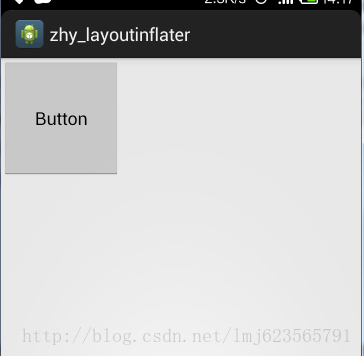
下面看一下输出结果,和Activity的展示:
1
2
3
07-27 14:17:36.703: E/TAG(2911): view1 = android.widget.Button@429 d1660 , view1.layoutParams = null 07-27 14:17:36.703: E/TAG(2911): view2 = android.widget.Button@42 a0e120 , view2.layoutParams = android.widget.FrameLayout$LayoutParams @42 a0e9a0 07-27 14:17:36.703: E/TAG(2911): view3 = android.widget.FrameLayout@42 a0a240
效果图:
View view3 = mInflater.inflate(R.layout.activity_main,(ViewGroup)findViewById(android.R.id.content), true);
这个方法内部已经执行了root.addView(temp , params); 上面已经解析过了。
也可以看出:和我们的推测完全一致,到此已经完全说明了inflate3个重载的方法的区别。相信大家以后在使用时也能选择出最好的方式。不过下面准备从ViewGroup和View的角度来说一下,为啥layoutParams为null,就不能这确的处理。
五、从ViewGroup和View的角度来解析 如果大家对自定义ViewGroup和自定义View有一定的掌握,肯定不会对onMeasure方法陌生: ViewGroup的onMeasure方法所做的是:
为childView设置测量模式和测量出来的值。
如何设置呢?就是根据LayoutParams。
如果childView的宽为:LayoutParams. MATCH_PARENT,则设置模式为MeasureSpec.EXACTLY,且为childView计算宽度。
如果childView的宽为:固定值(即大于0),则设置模式为MeasureSpec.EXACTLY,且将lp.width直接作为childView的宽度。
如果childView的宽为:LayoutParams. WRAP_CONTENT,则设置模式为:MeasureSpec.AT_MOST
高度与宽度类似。
View的onMeasure方法:
主要做的就是根据ViewGroup传入的测量模式和测量值,计算自己应该的宽和高:
一般是这样的流程:
如果宽的模式是AT_MOST:则自己计算宽的值。
如果宽的模式是EXACTLY:则直接使用MeasureSpec.getSize(widthMeasureSpec);
对于最后一块,如果不清楚,不要紧,以后我会在自定义ViewGroup和自定义View时详细讲解的。
大概就是这样的流程,真正的绘制过程肯定比这个要复杂,就是为了说明如果View的宽和高如果设置为准确值,则一定依赖于LayoutParams,所以我们的inflate(resId,null)才没能正确处理宽和高。
参考:Android LayoutInflater深度解析 给你带来全新的认识 Android编程之LayoutInflater的inflate方法实例