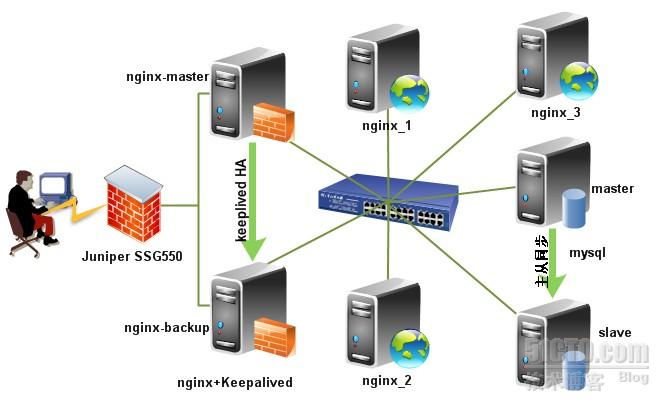
如何实现Nginx+Keepalived中Nginx进程的高可用


此架构我简单说明下:
一般为了维护方便,企业网站的服务器都在自己的内部机房里,只开放了Keepalived的VIP地址的两个端口80、443,通过Juniper SSG550防火墙映射出去,外网DNS对应映射后的公网IP。此架构的防火墙及网络安全说明如下:此系统架构仅映射内网VIP的80及443端口于外网的Juniper SSG550防火墙下,其他端口均关闭,内网所有机器均关闭iptables及ipfw防火墙;外网DNS指向即通过Juniper或华赛USG5000映射出来的外网地址。本节内容出自我的项目方案,这种负载均衡方式同时也应用于我公司的电子商务网站中,目前已稳定上线一年多了。通过下面的内容,大家可以迅速架构一个企业级 的负载均衡高可用的Web环境。在负载均衡高可用技术上,我一直主力推崇以Nginx+Keepalived作Web的负载均衡高可用架构,并积极将其应 用于真实项目中,此架构极适合灵活稳定的环境。Nginx负载均衡作服务器遇到的故障一般有:服务器网线松动等网络故障;服务器硬件故障发生损坏现象而crash;Nginx服务进程死掉(这种情况理论上会遇到,但事实上我线上的服务器没有出现过这种情况,足以证明了Nginx作为负载均衡器/反向代理服务器的稳定性,我们可以通过技术手段来解决这一问题);

Read More

更改nginx网站根目录

默认网站根目录为/usr/local/nginx/html,要将它改成/home/www
vi /usr/local/nginx/conf/nginx.conf
将其中的

1
2
3
4
location / {
root html;
index index.php index.html index.htm;
}

改为

1
2
3
4
location / {
root /home/www;
index index.php index.html index.htm;
}

Read More

nginx上支持.htaccess伪静态的配置实例

本文介绍下,在nginx上配置.htaccess伪静态的方法,有需要的朋友参考下吧。

在apache上.htaccess转向,只要apache编译的时候指明支持rewrite模块即可。

但是换到nginx上方法会有不同,有人说把.htaccess转向规则写到nginx的配置文件里面,官方提供的方法之一,肯定可行的。
不过,此方法有个问题:不方便,下次要更改一个伪静态转向规则的时候还得去nginx的配置文件或者nginx的虚拟网站的配置文件里面去改,相比apache直接在目录下放置.htaccess文件,nginx的这个办法显然很原始。

解决方法:
在nginx的配置文件中include .htacces文件就可以实现相同的功能了。

Read More

nginx配置多域名

1
2
3
4
5
6
7
8
9
10
11
12
13
14
15
16
17
18
19
20
21
22
23
24
25
26
27
28
29
30
31
32
33
34
35
36
37
38
39
40
41
42
43
44
45
46
47
48
49
50
51
52
53
54
55
56
57
58
59
60
61
62
63
64
65
66
67
68
69
70
71
72
73
74
75
76
77
78
79
80
81
82
83
84
85
86
87
88
89
90
91
92
http{	
# 第一个虚拟主机
server {
listen 80;
server_name aaa.domain.com;

#access_log logs/host.access.log main;

location / {
root /usr/share/nginx/html/aaa;
index index.php index.html index.htm;
}

error_page 404 /404.html;
location = /404.html {
root /usr/share/nginx/html;
}

# redirect server error pages to the static page /50x.html
#
error_page 500 502 503 504 /50x.html;
location = /50x.html {
root /usr/share/nginx/html;
}


# pass the PHP scripts to FastCGI server listening on 127.0.0.1:9000
#
location ~ \.php$ {
root /usr/share/nginx/html/aaa;
fastcgi_pass 127.0.0.1:9000;
fastcgi_index index.php;
fastcgi_param SCRIPT_FILENAME $document_root$fastcgi_script_name;
include fastcgi_params;
}

}

# 第二个虚拟主机
server
{
# 监听的IP和端口
listen 80;
# 主机名称
server_name bbb.otherdomain.com;
# 访问日志文件存放路径
access_log logs/bbb.otherdomain.com.access.log combined;
location /
{
# 默认首页文件,顺序从左到右,如果找不到index.html文件,则查找index.htm文件作为首页文件
index index.html index.htm;
# HTML网页文件存放的目录
root /usr/share/nginx/html/aaa;
}
}


# another virtual host using mix of IP-, name-, and port-based configuration
#
#server {
# listen 8000;
# listen somename:8080;
# server_name somename alias another.alias;

# location / {
# root html;
# index index.html index.htm;
# }
#}


# HTTPS server
#
#server {
# listen 443 ssl;
# server_name localhost;

# ssl_certificate cert.pem;
# ssl_certificate_key cert.key;

# ssl_session_cache shared:SSL:1m;
# ssl_session_timeout 5m;

# ssl_ciphers HIGH:!aNULL:!MD5;
# ssl_prefer_server_ciphers on;

# location / {
# root html;
# index index.html index.htm;
# }
#}
}

Read More